

If you’re searching for the best office chair back pain relief, you’ve already noticed a frustrating problem: most buying guides promise sweeping pain reductions without showing a single clinical trial. The reality, as you’ll see, is far more nuanced. A chair can improve comfort, but the scientific evidence that any specific model cuts chronic low back pain by a certain percentage is thin. This guide breaks through the marketing and gives you a clinician-informed, metric-driven checklist you can use right in the store or during a trial so you actually choose a chair that fits your body and pain pattern.
Key Takeaways
- No high-quality research proves a specific consumer chair reduces chronic back pain by a defined percentage. The evidence is low-quality and conflicting. Use adjustability, not brand hype, to find relief.
- Chiropractors and spine clinicians rely on hard metrics: seat height 40–55 cm, seat depth with a 3–5 cm gap behind the knee, lumbar prominence of ~3–5 cm, and a recline around 100–110°. Check these before you buy.
- Budget chairs often fail because of misaligned lumbar positions, sharp seat front edges that compress nerves, and backrests that either push you too far forward or let you sink too far back. You can avoid these traps by running the 10‑minute test explained below.
- Quick summary — what the science actually says
- Why reviews and marketing overpromise — the evidence gap explained
- The closest thing to numbers you can rely on (what small trials showed)
- The three real user problems to watch for in budget back‑pain chairs
- What chiropractors and spine clinicians actually want you to check (metric checklist)
- How to test a chair in 10 minutes (in store or during a trial)
- Which lumbar mechanisms actually have evidence — and which do not
- Missing sub‑topics you must cover (content gaps competitors ignore)
- Practical buying playbook (budget tiers & what to prioritize)
- Assembly, durability, and common quality traps to avoid
- How we select chairs we recommend — evidence and trial‑first approach
- Conclusion: Your 3‑Step Action Plan for Choosing the Best Office Chair for Back Pain
- Frequently Asked Questions
Quick summary — what the science actually says
If you were hoping a chair swap would drop your VAS pain score by 40%, the data will disappoint you. A 2023 systematic review on chair interventions for low back pain concluded that the evidence is “very low‑quality to low‑quality” and conflicting. Across the two included RCTs and ten repeated‑measures studies, some showed a small positive effect while others found no meaningful change. The review explicitly states that chair interventions are not recommended as a stand‑alone treatment to reduce low back pain or discomfort based on current evidence. (Source)

What does that mean for you? Switching from a generic chair to a well‑configured ergonomic model can improve comfort and may help you avoid postures that trigger symptoms. But it’s not a cure. Set your expectations around better sitting mechanics and reduced aggravation, not a miracle.
Why reviews and marketing overpromise — the evidence gap explained
Most “best office chair for lower back pain” articles lean heavily on comfort ratings and spinal posture measurements from studies on healthy people. They rarely report hard clinical pain reductions in chronic sciatica or herniated disc patients. Through early 2025, no high‑quality RCTs or clinical trials have compared a named consumer ergonomic chair vs. a generic office chair and reported a numeric VAS/% pain reduction in those specific patient groups. (2024 systematic review)
The disconnect is massive. A manufacturer might show that their lumbar support increases lordosis by 5° in 20 asymptomatic students, then imply it “relieves sciatica.” That’s not clinical proof. Buyers who expect a definitive pain score drop often return chairs frustrated. Understanding this gap — and still using chair metrics to stack the odds in your favor — is the whole point of this guide.
The closest thing to numbers you can rely on (what small trials showed)
Some individual studies have reported modest improvements of roughly 1–2 cm on a 10‑cm Visual Analog Scale (VAS), equivalent to a ~10–20% relative reduction in perceived pain, when using a modified ergonomic chair vs. a standard one. But these trials were short‑term, involved general office workers, and were not focused on chronic sciatica or herniated disc populations. (2022 chair design study) The evidence was judged low quality, and the findings cannot be generalized to anyone buying a “best desk chair for sciatica” today.
Still, these signals are worth noting because they suggest that better adjustability and lumbar support configuration can nudge pain in the right direction. That’s why moving from “no measurement” to “measurable fit” is your best practical strategy.
The three real user problems to watch for in budget “back‑pain” chairs
Amazon and Reddit threads reveal recurring design failures in sub‑$500 chairs marketed for back pain. These aren’t vague “bad lumbar” complaints — they’re specific mechanical mismatches that can worsen symptoms, especially if you have a herniated disc or sciatica.
1. Misaligned, fixed lumbar mechanisms. The lumbar pad sits too high or too low, often digging into the sacrum or thoracic spine, or it slides down during the day. This creates focal pressure exactly where you don’t want it. Many chairs with “lumbar support” actually place the peak at L1 instead of L4-L5, flattening the natural curve.
2. seat pan geometry that compresses nerves. A sharp front edge without a waterfall shape, a minimum seat depth that’s still too long for shorter users, or a locked‑flat seat lacking forward tilt can increase pressure under the thighs and aggravate sciatic‑type pain. In some synchro‑tilt designs, recline lifts the front of the seat too much, further trapping the sciatic nerve.
3. Backrest recline that fights your lumbosacral angle. When the recline is too stiff, you can’t reach a relaxing 100–110° “mid‑recline” without pushing off with your legs. When it’s too loose, you sink into excessive extension or flexion, straining a herniated disc. Budget chairs often lack a stable, adjustable tilt tension, making the entire backrest mechanism a liability rather than a relief tool.
These three issues — not just the absence of a lumbar “feature” — are what send chairs back. If you are specifically looking for an office chair for herniated disc recovery, the next section shows you exactly what to measure instead of hoping the marketing copy is right.
What chiropractors and spine clinicians actually want you to check (metric checklist)
Clinicians from institutions like the Virginia Spine Institute emphasize concrete adjustability ranges over brand names. (Clinical guidance) Use these pass/fail thresholds when evaluating any chair — whether it costs $300 or $900.
- Seat height range: Must cover roughly 40–55 cm so you can plant your feet flat with knees at or slightly below hip level. This accommodates heights from about 5’0″ to 6’2″.
- Seat depth adjustability: Look for a range of ~4–6 cm. When your back touches the backrest, you need a 3–5 cm gap (2–3 finger breadths) behind the knee. A fixed‑depth chair almost never fits both short and tall users.
- Lumbar prominence & vertical travel: The support should create ~3–5 cm of lordotic prominence and have vertical travel so you can center it on your lowest mobile lumbar segments. Clinicians strongly prefer vertically movable pads over a fixed “lumbar bar.”
- Recline angle & stability: You need a controlled, stable mid‑range recline around 100–110°. This angle reduces intradiscal pressure compared to strict upright sitting, but still lets you work.
- Waterfall front edge: The seat should curve down at the front to relieve thigh pressure. This is non‑negotiable if you have sciatic or piriformis‑type symptoms.
- Weight capacity: Aim for ≥250–300 lb to prevent premature sag and loss of support. Higher‑capacity models exist for bariatric needs.
These numbers come from clinical recommendations and ergonomic guidelines, not from lab tests on pain. Still, they give you a direct way to filter out the vast majority of chairs that sound right but don’t fit right.
How to test a chair in 10 minutes (in store or during a trial)
bring a small tape measure and a 2‑week symptom diary. While you can’t predict long‑term outcomes in 10 minutes, you can weed out obvious mismatches using the clinician metrics above.
1. Set the seat height and depth first. Adjust height until your feet are flat and knees at ~90°. Slide the seat depth so you have exactly 3–5 cm between the front edge and the back of your calf. If you can’t achieve that, the chair doesn’t fit your thigh length.
2. Position the lumbar support. Identify where the peak of the curve presses. Move it vertically until it hits the L4‑L5 area (roughly belt line). The pad should create noticeable but not painful lordosis — somewhere around 3–5 cm of forward contour. If the support is non‑adjustable or slams into your sacrum, rule the chair out.
3. Test recline at your work posture. Lock the backrest at ~100–110° and spend 5 minutes mimicking typing. Check whether your lumbosacral comfort improves or whether you have to brace with your feet or tense your core to stay there. If you can’t hold that angle without effort, the mechanism will fight you all day.
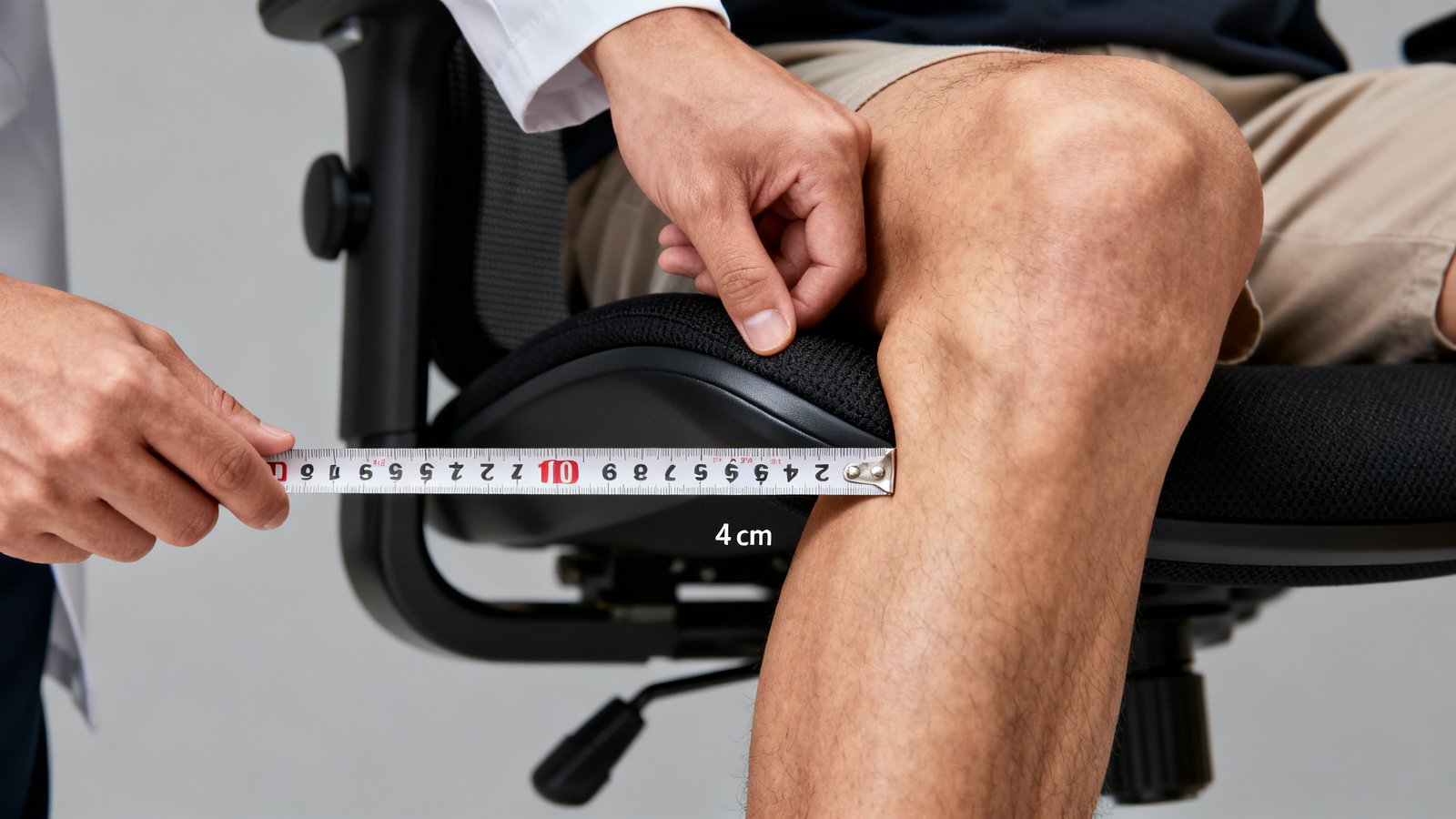
4. Inspect the front edge and armrests. Run your palm along the seat front; it should slope down smoothly, not ridge sharply. Set armrests so your elbows stay close to your sides and forearms are parallel to the floor, relieving compensatory strain on your low back.
This 10‑minute protocol catches the most common fit failures. If a chair passes, keep the detailed symptom diary over a 2‑week trial to separate novelty relief from genuine improvement.
Which lumbar mechanisms actually have evidence — and which do not
Many “ergonomic chair for chronic back pain relief” guides imply that an air‑inflating bladder or a spring‑loaded metal plate is superior. The evidence doesn’t support that. Systematic reviews conclude that any well‑configured, adjustable lumbar support that maintains neutral lordosis and allows some micro‑movement can help with comfort, but no high‑quality RCT has directly compared inflatable air bladders vs. adjustable metal plates vs. tension‑controlled springs in chronic LBP patients. (2024 review)
This is a crucial point: marketing materials for a “best lumbar support office chair 2026” often tout a specific mechanism as the secret sauce. In reality, the benefit is mechanism‑agnostic. What matters is that you can move the supportive element up/down and adjust its prominence, and that it stays in place. Don’t pay a premium for a patented air cell unless you’ve verified it actually hits your pain level and holds over time.
Missing sub‑topics you must cover (content gaps competitors ignore)
Top‑ranking articles on “best desk chair for sciatica” or “best lumbar support office chair 2026” routinely omit areas that clinicians consider pivotal. Here are the gaps you can leverage to make a more informed decision.
- Seat tilt angles and hip posture. No one quantifies forward tilt ranges (e.g., -5° to -8°) and their effect on piriformis tension or foraminal space. If you have sciatica, a mild forward seat tilt reduces hip flexion and can decompress the nerve, yet most guides never mention it.
- Memory foam vs mesh for nerve compression. Heat and comfort get all the attention. Few guides discuss whether extra‑firm foam increases pressure on the buttock and posterior thigh, potentially aggravating a compressed sciatic nerve, or whether mesh simply lowers contact area without addressing pressure hotspots.
- Dynamic lumbar tracking and disc mechanics. Premium chairs offer lumbar systems that follow your spine as you move. The biomechanical rationale — maintaining intradiscal pressure within a safer range during micro‑shifts — rarely appears in consumer content. No long‑term study confirms this translates to fewer herniation flare‑ups.
- Body‑size‑specific adjustability ranges. Most articles avoid hard numbers, leaving you guessing whether a chair fits a 5’4″ frame with a disc bulge.
- Longitudinal outcomes. Commercial posts almost never cite follow‑up data beyond a few days. Real‑world durability and pain trajectory over months are what matter, and they’re missing from the conversation.
By demanding numeric threshold data and testing them yourself, you bridge these gaps immediately.
Practical buying playbook (budget tiers & what to prioritize)
Given the evidence limits, prioritize chairs that score high on metric fit and offer a generous trial policy. Here’s how the landscape roughly breaks down.
$200–400: Chairs in this range (like some Gabrylly or Mimoglad models) can offer vertical lumbar adjustment and waterfall edges, but seat depth adjustability and robust tilt mechanisms are often missing. If you are under 5’8″ or over 6’0″, double‑check minimum and maximum depths carefully. Expect the mesh to potentially sag within the first year. Look for models with at least a 30‑day return window.
$400–800: This is where most of the clinician‑backed adjustability metrics become available. Chairs like the Branch Verve, Herman Miller Sayl, or Steelcase Series 1 often provide 5 cm of seat depth adjustment, movable lumbar pads with decent vertical range, and stable 100–110° recline. Many include 4D armrests and waterfall edges. Spend in this tier if you need a best office chair back pain solution that can be dialed in to your body, not a one‑size‑pretends‑to‑fit‑all affair. Prioritize chairs with 30‑ to 90‑day trials so you can run the 10‑minute test at home.
$800+: Chairs like the Herman Miller Aeron or Steelcase Leap (see our detailed Aeron vs Leap comparison) add dynamic lumbar tracking, highly refined tilt mechanisms, and 12‑year warranties. The adjustability range is often very good. However, the extra cost doesn’t buy you more clinical pain‑reduction data — it buys durability, build precision, and tweakability. If your body fits these chairs and the trial confirms comfort, they can last over a decade. Our office chair buying guide walks through exactly what to look for across all price points.
Always check the retailer’s return policy, tax, and shipping before purchase; exact out‑of‑pocket costs are proprietary and change frequently. No chiropractic association publishes a centralized pricing list, so trialability is your safety net.
Assembly, durability, and common quality traps to avoid
Even a perfectly adjusted chair fails if the build gives up after six months. User review themes across price tiers highlight:
- Sagging mesh that turns a contoured backrest into a hammock, losing lumbar support exactly where you need it.
- Overly tight mesh that creates focal pressure points, especially in the lower back, mimicking the feeling of a permanent knot.
- Lumbar sliders that drift down after a few weeks of use. This is a common defect in budget chairs where friction‑fit mechanisms loosen.
- Gas cylinders that develop a slight wobble, altering tilt behavior and making the recline feel unpredictable.
When assembling, check for squeaks and alignment during the first week. If the lumbar pad won’t stay in position or the mesh already looks uneven, photograph it and start the return process. Those early quality signs predict long‑term support failure. Also, ensure the chair can handle your weight without bottoming out; a capacity of 300 lb is safer for most adults.
How we select chairs we recommend — evidence and trial‑first approach
In our best ergonomic chair under 300 roundup and higher‑tier analyses, we never claim a chair “cures” sciatica or reduces your VAS by a specific number. Instead, we match each model to the adjustability metrics that chiropractors and spine specialists emphasize. For example, a chair we mention will have a seat depth range within 4–6 cm, a lumbar pad with vertical travel of at least 5 cm, and a waterfall front edge. When manufacturer specs are unverified by independent testing, we flag that openly.
We also urge you to keep a short symptom diary for at least 2 weeks during any trial, noting morning pain, end‑of‑day stiffness, and any radiating nerve symptoms. This gives you a personalized evidence base instead of relying on someone else’s anecdote.
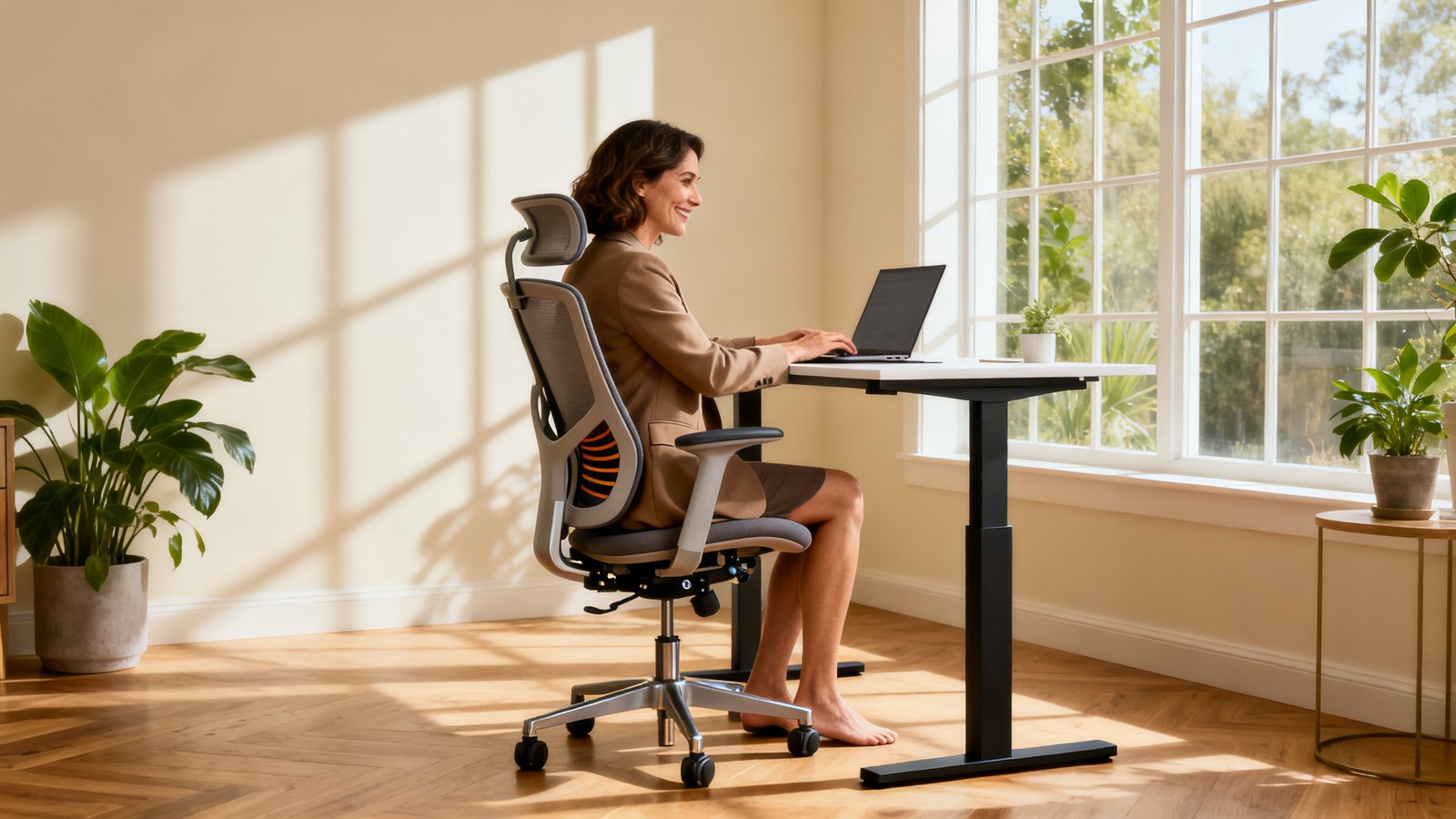
Conclusion: Your 3‑Step Action Plan for Choosing the Best Office Chair for Back Pain
You now have a clear, evidence‑aware path that cuts through hype. The truly best office chair back pain solution for you won’t be the one with the most stars on Amazon — it’ll be the one that passes your personal metric checklist and proves itself over several weeks of use.
Pick one of these three steps today:
A) Visit a store and run the 10‑minute test. Take a tape measure, check seat depth, lumbar position, and recline angle. If the chair fails any metric, walk away regardless of the brand name.
B) Buy a chair with a 30‑ to 90‑day trial online. Keep a daily symptom diary for at least 2 weeks, noting pain levels before work, after 4 hours, and at day’s end. Only keep the chair if you see a clear trend of reduced aggravation, not just “different” sensations.
C) Consult your chiropractor or physiotherapist. Bring the metric checklist and your spinal MRI findings. Have them match the required lumbar prominence and recline angle to your specific disc level. Many clinicians prefer vertically movable pads over exotic internal mechanisms, so focus the discussion on positioning, not gimmicks.
Remember, no chair is a stand‑alone treatment. Combine good sitting ergonomics with movement, core stability work, and professional guidance. For more on creating a complete pain‑smart workspace, read our ergonomic workstation setup and clutter free desk setup guides. A well‑built chair, properly adjusted, can be a powerful tool — just not a miracle cure.
Frequently Asked Questions
Will this chair cure my herniated disc?
No. Chair interventions are not recommended as a stand‑alone treatment to reduce LBP or discomfort based on current low‑quality evidence. A properly fitted chair can reduce postures that aggravate a herniated disc, but it does not shrink the bulge. Always follow your spine specialist’s rehabilitation plan.
Which lumbar support mechanism is best — air bladder, spring plate, or tension‑controlled?
No high‑quality RCT evidence shows one mechanism is superior for chronic pain reduction. Systematic reviews support any well‑configured, adjustable lumbar support that maintains the natural lordotic curve. The ability to move the pad vertically and adjust prominence matters more than the internal technology.
How long should I trial a chair before deciding?
Clinicians suggest at least 2 weeks using a symptom diary. Day‑1 comfort can be misleading. Track your low back pain, sciatic symptoms, and stiffness consistently. If there is no positive trend or if pain worsens, the chair likely doesn’t fit your biomechanical needs.
I’m 5’2″ with sciatica. Which metric is most critical?
Seat depth adjustability is often the deal‑breaker for shorter users. The chair must allow a minimum depth where you can leave 3–5 cm behind the knee while your back is against the backrest. A depth slider that reduces to about 38‑40 cm is ideal. Also ensure the lumbar pad can drop low enough to hit L4‑L5.
Are mesh chairs better than foam for nerve pain?
Mesh reduces heat and distributes pressure more evenly in some designs, but there is no direct evidence that it reduces nerve compression compared to high‑quality contoured foam. Some users find mesh too hard if tension is high, creating pressure points. Your 10‑minute test and symptom diary are the only reliable guides.